


You've explained the diagnosis carefully. You've talked them through the radiograph, maybe sketched it on a notepad or held up a mirror. Your patient nods along. Then, as they're getting up to leave, they ask a question that tells you the explanation didn't quite land.
It's a common moment. Dental anatomy is hard to picture if you don't look at it every day, and patients take in information in different ways. Some are nervous, some are working in a second language, and some simply understand things better when they can see them.
Then there's the record. However thorough the conversation was, it often ends up as a single line: "risks and benefits discussed".
Show & Tell is built for that moment. Don't just tell them, show them.
What is Show & Tell?
Show & Tell is a library of short animated videos that explain common dental conditions and treatments. You play them from inside the Kiroku notes editor, so you can show the patient while they're in the room with you.
Videos are grouped into collections covering prevention, tooth decay, gum disease, tooth wear, oral surgery, missing tooth options, cosmetic treatment and crooked teeth. Within each collection, videos can explain the diagnosis, the treatment options and what may happen if a problem is left untreated, with side-by-side comparisons for when a patient is weighing up their options.
If the name sounds familiar, that's intentional. Tell, show, do is a technique most dental professionals learn early in training. Show & Tell gives you the "show" part in a few clicks.
How Show & Tell fits into your appointment
There's no separate app or login. Show and Tell sits inside the interface you're already looking at, and integrates smoothly with your existing Kiroku workflows for notes and letters. Jeevan, one of our clinical team, puts it simply: "It doesn't add any time to your workflow. It's shortening it."
Find the right video quickly
Open the Show & Tell panel in the notes editor and browse by collection or search for what you need. Search recognises different words for the same thing, so typing the clinical term or the everyday one brings up the same video, whether that's "pericoronitis" or "wisdom tooth inflammation".
Hover over a video to preview it before you play it. Your favourites appear first, followed by the videos you've played most recently, so the ones you use often are always to hand.
Show it to your patient
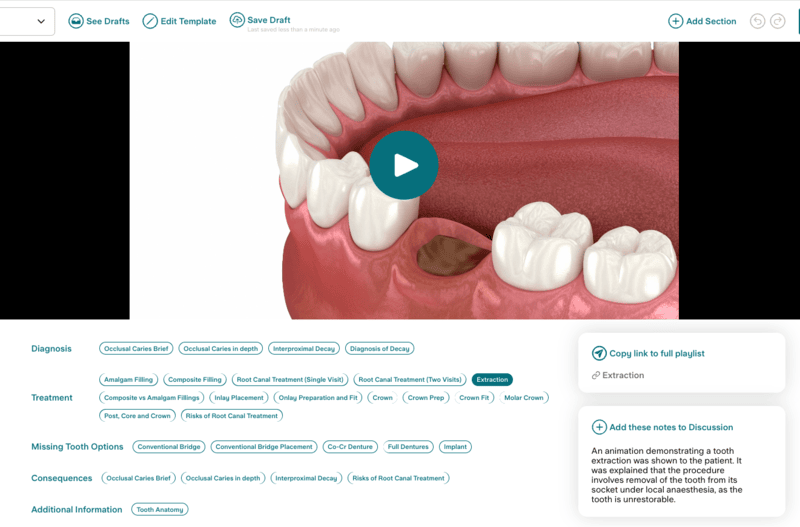
Play the video on screen while your patient is with you. The videos have no sound by design, so you talk your patient through it in your own words as it plays.
As Jeevan says: "The way you can talk over it as well, it just enhances your explanation of everything."
One question often leads to the next video. Nuha, another of our clinical team, might start with gingivitis, move on to periodontitis, then show interdental brushes, then switch to the flossing video when a patient says they only have floss.
Show & Tell works alongside Freestyle and Co-Pilot, so AI Voice keeps capturing the appointment while you show a video.
Add it to the record
Once you've played a video, Kiroku can record in your note that it was shown, by adding the video's explainer text to the Discussion section. Your record then shows what the patient was shown as well as what was discussed, but you can always add extra details to your notes.
Follow up after the appointment
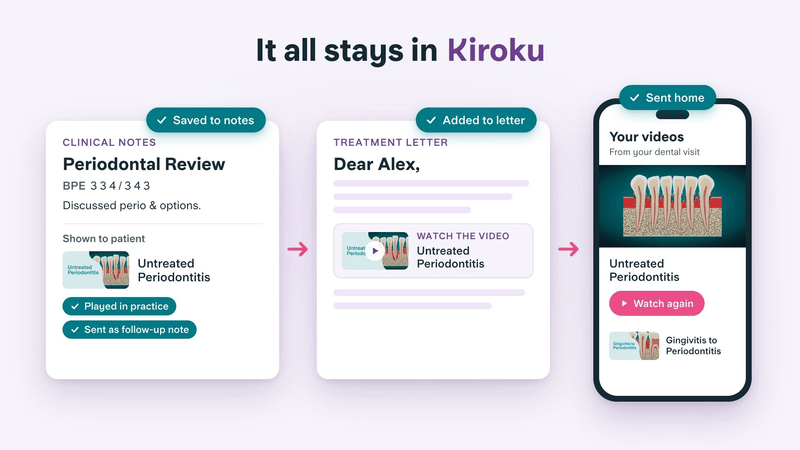
Patients don't always take everything in while they're in the chair. You can send them a link to the videos you showed, so they can watch again at home.
Jeevan’s own experience supports this: "Sometimes you say something to someone and they get tunnel vision or they block everything else out. If you can then send that video and they watch it at home... it gives them so much more understanding."
You can easily incorporate links to videos into your Kiroku Docs, or copy the video links to add to any email or message, however you like to send these.
What it means for your patients
A short animation of a crown prep or a root canal treatment shows patients what a verbal description can only suggest. Models help, but they only go so far.
"The actual thing that people are cautious of is they don't know how their tooth end up looking? Why is it looking smaller? What's the process of that? You can never show that on a model." Jeevan, Kiroku clinical team
Nuha found the same with treatments she has no model for: "I have a model for a crown, but I'm not doing a crown. I'm doing an onlay. How do I explain to you what an onlay is now that I have the model?"
It also helps to put the video next to the patient's own radiographs. Nuha shows the gum disease animation, then goes back to the patient's X-rays to show where their bone is now and how it has changed. "It becomes relatable. It becomes like a real thing for them."
Visual explanations can help where words alone fall short, for example when there's a language barrier, when dental terms are unfamiliar, or when a patient processes information differently. One hygienist using Kiroku tried it with as many patients as she could in launch week:
"It seemed like things were really clicking for patients and they had a much better understanding of what I was explaining." Hygienist, Kiroku user
You stay in control throughout. You decide when a video will help and which one to use. For some patients, a conversation and a mirror may still be the better fit.
What it means for you
Comparing treatment options can sound like selling, however neutral you try to be. Nuha has found this with white and silver fillings: “It just purely sounds like you’re selling when you’re telling them, ‘White is this, silver is this.’”
Showing the Composite vs Amalgam Fillings video changes that, because the patient sees the comparison for themselves rather than taking your word for it:
“When they can physically see a video comparing the two, the conversation is more about the different impacts of a silver vs white filling, beyond the visual... It’s as if you’ve got someone else in the room as a secondary dentist being like, ‘Yeah, this is gonna happen as well.’ So it’s not just me telling you this.” Nuha, Kiroku clinical team
In her experience, once patients can see the differences, “they’re more likely to go for the one that’s better for them.”
It also helps with consent. Your note shows what information the patient was given, which supports your record of the consent discussion.
"From a consent point of view, for me, I found it so useful where now I have complete faith that my patients understand what they're gonna go through." Jeevan, Kiroku Clinical Team
For more on this, see our post on the complexities of medical consent.
And it all happens in one place: notes, patient videos and letters in a single appointment, rather than spread across separate tools.
Any clinician who explains conditions or treatment to patients, including dentists, foundation dentists, dental therapists and hygienists can benefit from Show & Tell.
Try Show & Tell now
Show & Tell is now in your notes editor. Look for the Show & Tell icon, open the panel and browse the library before your next clinic. If you'd like a walkthrough, our help centre has a step-by-step guide to using Show & Tell.
There's no single right way to use it. You might show a video after taking radiographs, turn the screen or bring the patient round to see it, or send videos after the appointment instead. Find what works for your patient journey.
If there's a video you'd find useful, tell us. As Jeevan says, "Kiroku customers I think should always feel comfortable messaging us with new video ideas that they want.”
New to Kiroku? Sign up now to bring your notes, letters and patient videos together in one place.


